> ## Documentation Index
> Fetch the complete documentation index at: https://help.kibu.com/llms.txt
> Use this file to discover all available pages before exploring further.
# Group Settings
> Properly configured group settings are essential for efficient service delivery and accurate documentation. Kibu makes it easy to customize each group's settings to match your specific program requirements and compliance needs.
 ## Why Group Settings Matter
The right group configuration ensures:
* Staff can efficiently document services
* Members receive appropriate care and support
* Documentation meets compliance requirements
* Service tracking aligns with billing needs
Save time by configuring settings once and importing them to multiple groups! Instead of manually configuring each group's settings, you can set up one group exactly how you want it, then use the import feature to copy those same settings to all your other groups.
***
## Settings Explained
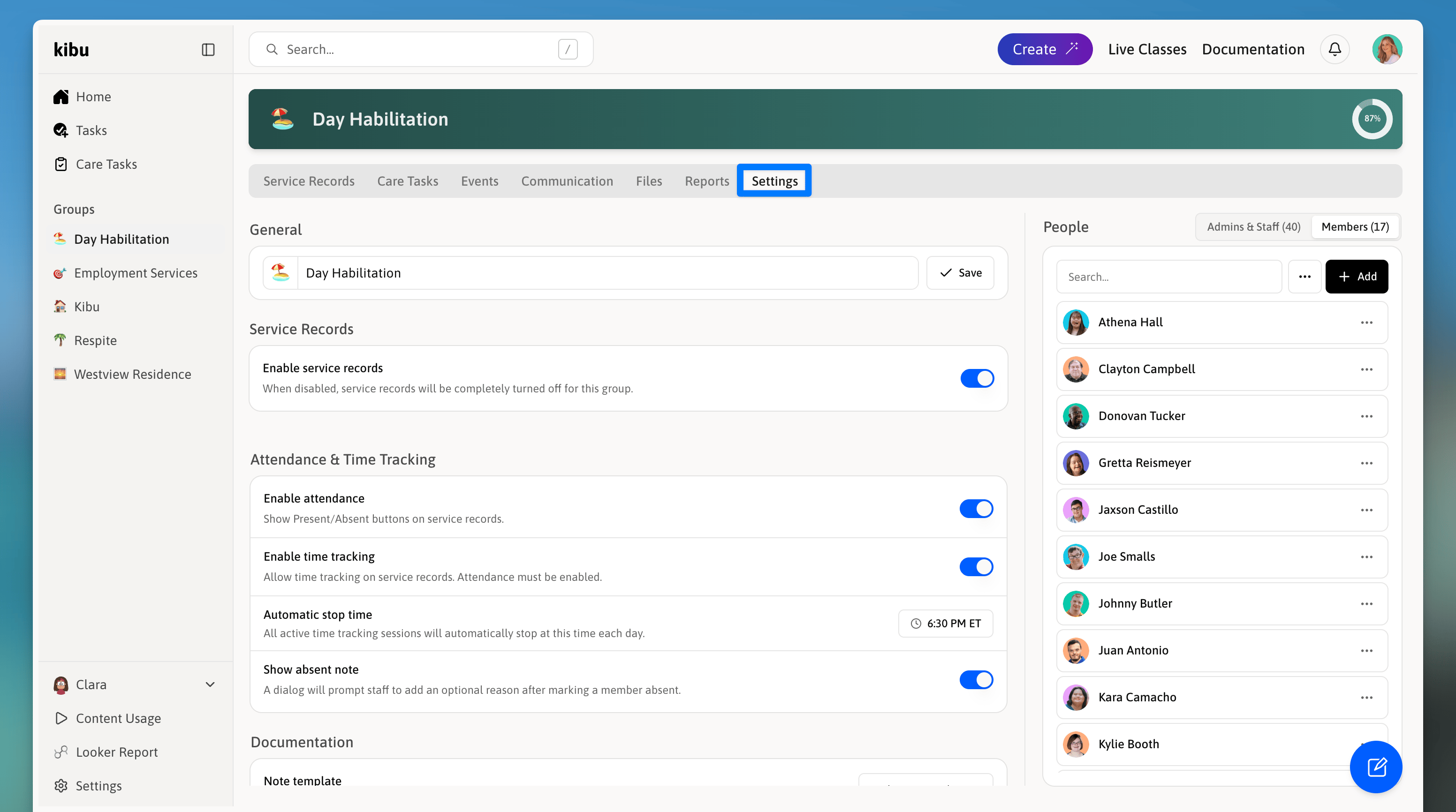
Here's a detailed breakdown of all group settings and what they control:
General Group Settings do not save automatically, press save at bottom of the page once you are finished.
### Service Record Settings
* **Default Setting:** Enabled
* **Description:** Controls the overall service record functionality for the group. When disabled:
* No new service records can be created
* Existing records remain accessible but locked
* All service record features are deactivated
* **Default Setting:** Enabled
* **Description:** Adds Present/Absent tracking to service records
* **Note:** Required for time tracking features
* **Impact:** Enables attendance reporting capabilities
* **Default Setting:** Enabled
* **Description:** Allows tracking of service duration and timing
* **Requirements:** Attendance must be enabled
* **Default Setting:** 11:59 PM
* **Description:** Sets a daily cutoff time at which all active time tracking sessions will automatically stop.
* **Use Case:** Useful for programs with fixed end times, ensuring time tracking does not run indefinitely if staff forget to stop it manually.
* **Default Setting:** Disabled
* **Description:** When enabled, a dialog will prompt staff to add an optional reason after marking a member absent.
* **Purpose:** Helps organizations capture context around absences for reporting and compliance purposes.
### Documentation Settings
* **Default Setting:** Enabled
* **Description:** Makes note entry mandatory before signing service records
* **Purpose:** Ensures proper documentation of services
* **Impact:** Staff cannot sign records without completing notes
* **Default Setting:** Default Template
* **Description:** Sets the automatic template for new service records
* **Contents:** Default template includes:
* Total Time Spent with member
* Progress review
* Additional Notes
* **Note:** Template completion is required
Note templates can be customized to fit your program's specific needs. As this cannot be modified directly by your organization, please reach out to our customer success team for assistance.
* **Default Setting:** Enabled
* **Description:** Enables multiple note attachments per service record
* **Benefit:** Allows multiple staff members to contribute documentation
* **Use Case:** Ideal for collaborative care settings
### Staff Settings
* **Default Setting:** Default to you
* **Description:** Sets the automatic staff assignment for new service records
* **Flexibility:** Can be modified per individual record
* **Purpose:** Streamlines record creation process
* **Default Setting:** Disabled
* **Description:** When enabled, each staff note will have its own time tracking, separate from member time tracking.
* **Use Case:** Ideal for programs that need to track staff hours independently from the time spent with individual members.
### Notifications
Group-level notifications keep admins and staff informed without requiring them to manually check the platform. There are three configurable notification types:
* **Description:** Automatically emails staff when they have unsigned service records or even if all notes are signed.
* **Purpose:** Reduces incomplete documentation and helps organizations stay compliant.
* **Description:** Sends a daily digest of unsigned notes to selected admins.
* **Purpose:** Gives supervisors a consolidated view of outstanding documentation across the group.
* **Description:** Sends a summary of active or ended time tracking sessions to selected admins.
* **Purpose:** Helps supervisors identify sessions that may have been left running unintentionally.
These settings can be adjusted at any time by group administrators. Changes will affect new service records but won't impact existing records.
### Danger Zone
Actions in the Danger Zone are irreversible. Proceed with caution.
* **Description:** Overwrites this group's settings with the settings from another group.
* **Use Case:** Useful when setting up multiple groups with identical configurations. Configure one group first, then import those settings to others to save time.
## Why Group Settings Matter
The right group configuration ensures:
* Staff can efficiently document services
* Members receive appropriate care and support
* Documentation meets compliance requirements
* Service tracking aligns with billing needs
Save time by configuring settings once and importing them to multiple groups! Instead of manually configuring each group's settings, you can set up one group exactly how you want it, then use the import feature to copy those same settings to all your other groups.
***
## Settings Explained
Here's a detailed breakdown of all group settings and what they control:
General Group Settings do not save automatically, press save at bottom of the page once you are finished.
### Service Record Settings
* **Default Setting:** Enabled
* **Description:** Controls the overall service record functionality for the group. When disabled:
* No new service records can be created
* Existing records remain accessible but locked
* All service record features are deactivated
* **Default Setting:** Enabled
* **Description:** Adds Present/Absent tracking to service records
* **Note:** Required for time tracking features
* **Impact:** Enables attendance reporting capabilities
* **Default Setting:** Enabled
* **Description:** Allows tracking of service duration and timing
* **Requirements:** Attendance must be enabled
* **Default Setting:** 11:59 PM
* **Description:** Sets a daily cutoff time at which all active time tracking sessions will automatically stop.
* **Use Case:** Useful for programs with fixed end times, ensuring time tracking does not run indefinitely if staff forget to stop it manually.
* **Default Setting:** Disabled
* **Description:** When enabled, a dialog will prompt staff to add an optional reason after marking a member absent.
* **Purpose:** Helps organizations capture context around absences for reporting and compliance purposes.
### Documentation Settings
* **Default Setting:** Enabled
* **Description:** Makes note entry mandatory before signing service records
* **Purpose:** Ensures proper documentation of services
* **Impact:** Staff cannot sign records without completing notes
* **Default Setting:** Default Template
* **Description:** Sets the automatic template for new service records
* **Contents:** Default template includes:
* Total Time Spent with member
* Progress review
* Additional Notes
* **Note:** Template completion is required
Note templates can be customized to fit your program's specific needs. As this cannot be modified directly by your organization, please reach out to our customer success team for assistance.
* **Default Setting:** Enabled
* **Description:** Enables multiple note attachments per service record
* **Benefit:** Allows multiple staff members to contribute documentation
* **Use Case:** Ideal for collaborative care settings
### Staff Settings
* **Default Setting:** Default to you
* **Description:** Sets the automatic staff assignment for new service records
* **Flexibility:** Can be modified per individual record
* **Purpose:** Streamlines record creation process
* **Default Setting:** Disabled
* **Description:** When enabled, each staff note will have its own time tracking, separate from member time tracking.
* **Use Case:** Ideal for programs that need to track staff hours independently from the time spent with individual members.
### Notifications
Group-level notifications keep admins and staff informed without requiring them to manually check the platform. There are three configurable notification types:
* **Description:** Automatically emails staff when they have unsigned service records or even if all notes are signed.
* **Purpose:** Reduces incomplete documentation and helps organizations stay compliant.
* **Description:** Sends a daily digest of unsigned notes to selected admins.
* **Purpose:** Gives supervisors a consolidated view of outstanding documentation across the group.
* **Description:** Sends a summary of active or ended time tracking sessions to selected admins.
* **Purpose:** Helps supervisors identify sessions that may have been left running unintentionally.
These settings can be adjusted at any time by group administrators. Changes will affect new service records but won't impact existing records.
### Danger Zone
Actions in the Danger Zone are irreversible. Proceed with caution.
* **Description:** Overwrites this group's settings with the settings from another group.
* **Use Case:** Useful when setting up multiple groups with identical configurations. Configure one group first, then import those settings to others to save time.