> ## Documentation Index
> Fetch the complete documentation index at: https://help.kibu.com/llms.txt
> Use this file to discover all available pages before exploring further.
# Rhythms Overview
> What Rhythms are, how templates and rhythms fit together, and when to use a Rhythm instead of a Care Task.
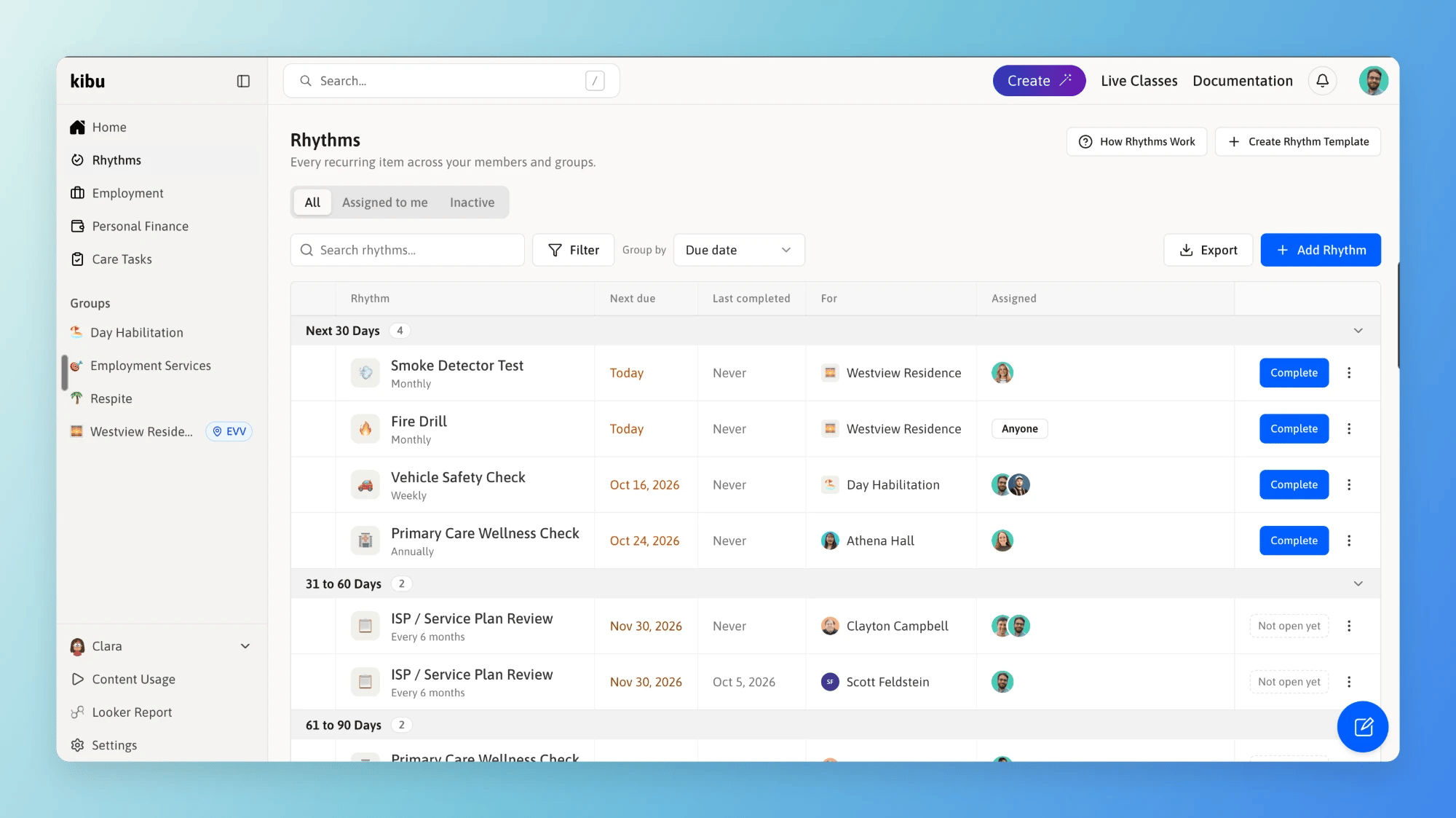 Rhythms are recurring items that come due on a schedule and leave a signed record behind. Fire drills, vehicle inspections, water temperature checks, annual ISP reviews, quarterly nursing reviews. Each one has a due date, an owner, and proof of what was done.
If your agency tracks this in a spreadsheet today, Rhythms replaces it.
## Key Concepts
What to capture and how often. Built once, in Settings. "Fire Drill" is a template.
One template attached to one member or one group. "Fire Drill for Westview Residence" is a rhythm.
Build a template once, then attach it everywhere it applies. Each rhythm keeps its own due date and its own history.
Rhythms are recurring items that come due on a schedule and leave a signed record behind. Fire drills, vehicle inspections, water temperature checks, annual ISP reviews, quarterly nursing reviews. Each one has a due date, an owner, and proof of what was done.
If your agency tracks this in a spreadsheet today, Rhythms replaces it.
## Key Concepts
What to capture and how often. Built once, in Settings. "Fire Drill" is a template.
One template attached to one member or one group. "Fire Drill for Westview Residence" is a rhythm.
Build a template once, then attach it everywhere it applies. Each rhythm keeps its own due date and its own history.
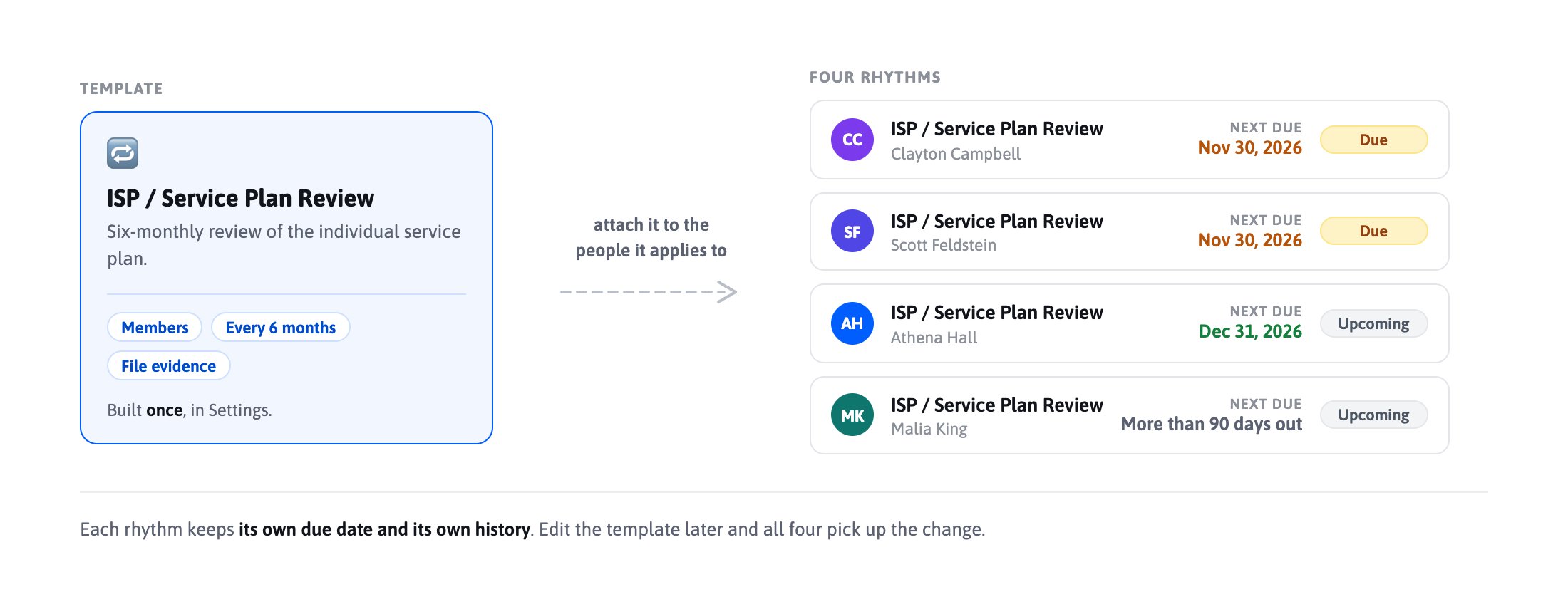 Completing a rhythm never ends it. Finish this month's fire drill and Kibu creates next month's.
## Rhythm or Care Task?
**Care Tasks** are medication and medical administration for one person. If it belongs on the MAR, it is a Care Task.
**Rhythms** are recurring items that need a checkbox, a form, or an uploaded file as the record. They can belong to a person, a house, a vehicle, or a program.
| | Care Tasks | Rhythms |
| - | - | - |
| What it is | Medication and medical administration | Recurring checks, reviews, and documentation |
| Timing | A set time of day | A due date, ready to complete any day before it |
| As-needed (PRN) | Yes | No |
| Attaches to | A member | A member or a group |
| The record | A documented administration or quick form, signed | A checkbox, form, or file, signed |
| Set up in | Settings > Quick Forms or
Completing a rhythm never ends it. Finish this month's fire drill and Kibu creates next month's.
## Rhythm or Care Task?
**Care Tasks** are medication and medical administration for one person. If it belongs on the MAR, it is a Care Task.
**Rhythms** are recurring items that need a checkbox, a form, or an uploaded file as the record. They can belong to a person, a house, a vehicle, or a program.
| | Care Tasks | Rhythms |
| - | - | - |
| What it is | Medication and medical administration | Recurring checks, reviews, and documentation |
| Timing | A set time of day | A due date, ready to complete any day before it |
| As-needed (PRN) | Yes | No |
| Attaches to | A member | A member or a group |
| The record | A documented administration or quick form, signed | A checkbox, form, or file, signed |
| Set up in | Settings > Quick Forms or
Member Profile > Medications | Settings > Rhythms |
Daily and specific-weekday schedules are available on **group** rhythms only. Daily documentation for one person belongs in Care Tasks.
## The Rhythms Page
Select **Rhythms** in the left sidebar to see everything open across the members and groups you have access to.
Items are grouped by how soon they are due: Overdue, Next 30 Days, 31 to 60 Days, 61 to 90 Days, and More Than 90 Days Out.
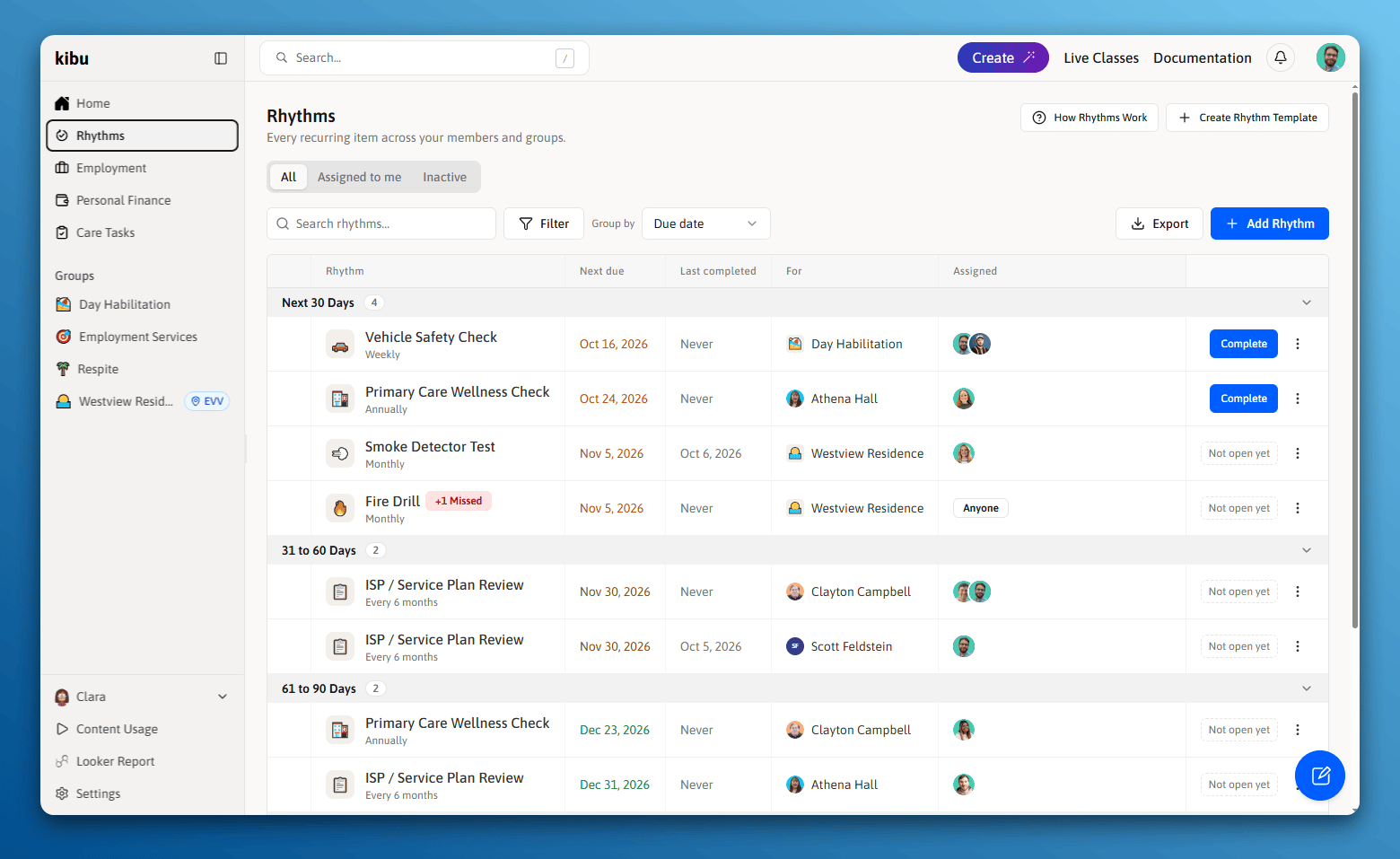 Three views sit across the top:
Everything in your scope. The page opens here.
Only the items you own.
Paused rhythms, which are never deleted.
**Filter** narrows by member, group, rhythm, assignee, or due window. **Group by** stacks rows by due date, group, assignee, or rhythm. Your filters are remembered next time.
Three views sit across the top:
Everything in your scope. The page opens here.
Only the items you own.
Paused rhythms, which are never deleted.
**Filter** narrows by member, group, rhythm, assignee, or due window. **Group by** stacks rows by due date, group, assignee, or rhythm. Your filters are remembered next time.
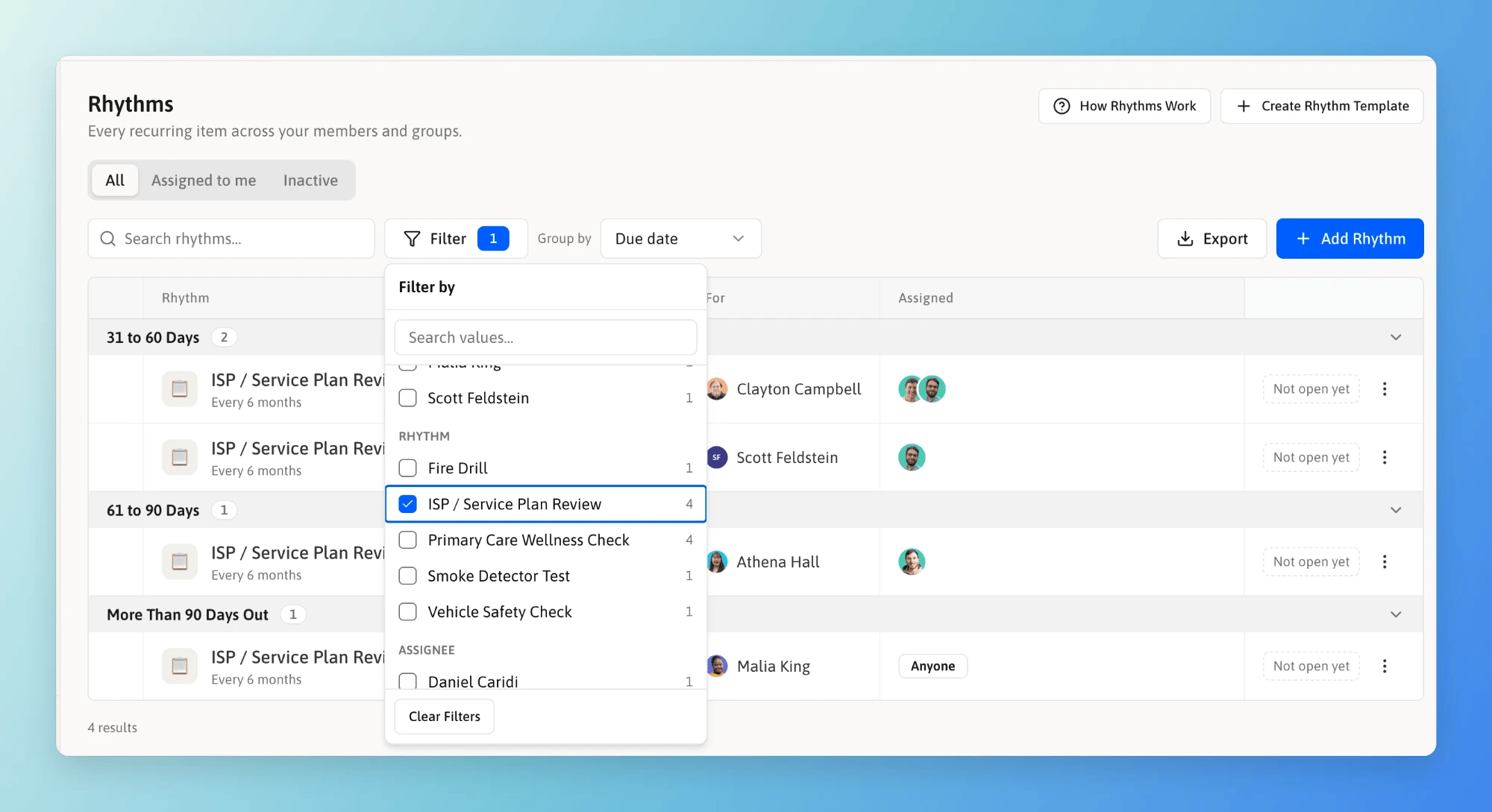 An item showing **Not open yet** instead of **Complete** is not close enough to its due date to sign off yet. The button appears on its own once that window opens.
## Where Rhythms Appear
The Rhythms tab lists what that person has coming due, plus their history.
The Rhythms tab lists what that house or program has coming due, along with the group's members.
Staff complete the items assigned to them from the Kibu app.
Emails and in-app notifications can deliver reminders and completion notices.
You can change an owner, view history, or remove a rhythm from any of these places.
## Who Can See What
You see rhythms for the members and groups already in your scope. Administrators build templates in Settings. Supervisors attach rhythms and change owners. Staff complete the items assigned to them.
Anyone who can complete items can complete any item in their scope, not only their own. The person who walked the building is not always the person it was assigned to.
Not seeing Rhythms? It can be switched off for an organization. Contact [Kibu Support](https://help.kibu.com/support/contact).
## Next Steps
Build a template, choose how the record is captured, and attach it.
Complete items, review history, and export your record.
This documentation is built and hosted on [Mintlify](https://mintlify.com), a developer documentation platform.
An item showing **Not open yet** instead of **Complete** is not close enough to its due date to sign off yet. The button appears on its own once that window opens.
## Where Rhythms Appear
The Rhythms tab lists what that person has coming due, plus their history.
The Rhythms tab lists what that house or program has coming due, along with the group's members.
Staff complete the items assigned to them from the Kibu app.
Emails and in-app notifications can deliver reminders and completion notices.
You can change an owner, view history, or remove a rhythm from any of these places.
## Who Can See What
You see rhythms for the members and groups already in your scope. Administrators build templates in Settings. Supervisors attach rhythms and change owners. Staff complete the items assigned to them.
Anyone who can complete items can complete any item in their scope, not only their own. The person who walked the building is not always the person it was assigned to.
Not seeing Rhythms? It can be switched off for an organization. Contact [Kibu Support](https://help.kibu.com/support/contact).
## Next Steps
Build a template, choose how the record is captured, and attach it.
Complete items, review history, and export your record.
This documentation is built and hosted on [Mintlify](https://mintlify.com), a developer documentation platform.