> ## Documentation Index
> Fetch the complete documentation index at: https://help.kibu.com/llms.txt
> Use this file to discover all available pages before exploring further.
# Staff Permissions & Roles
> Kibu's role-based access control and permissions.
## Quick Overview
Kibu uses a four-level role system where each role builds on the one before it, giving organizations granular control over what staff can see and do.
### Level 1: Staff
The foundational role for team members working directly with members. Staff can create and manage service records, track attendance, log Quick Notes, view life plans and member profiles, access medical history and medication records, create MAR entries, manage events, and access group and member files. They have read-only access to group settings.
### Level 2: Supervisor
Includes all Staff permissions, plus the ability to manage tasks, delete service records, manage time tracking entries, edit and delete Quick Notes, manage life plans, handle emergency contacts, and have full control over medical forms, medication records, and MAR management.
### Level 3: Admin
Includes all Supervisor permissions, plus full administrative control over the organization. Admins can create and manage groups, update group and organization settings, manage access controls, create admin accounts, create and delete member profiles, and manage organization-wide settings.
### Level 4: Super Admin
The highest level of access. Includes all Admin permissions, plus access to all groups across the organization, the ability to view all member information, modify time tracking entries, override system restrictions when necessary, and access billing information.
***
## Detailed Understanding of Staff Roles
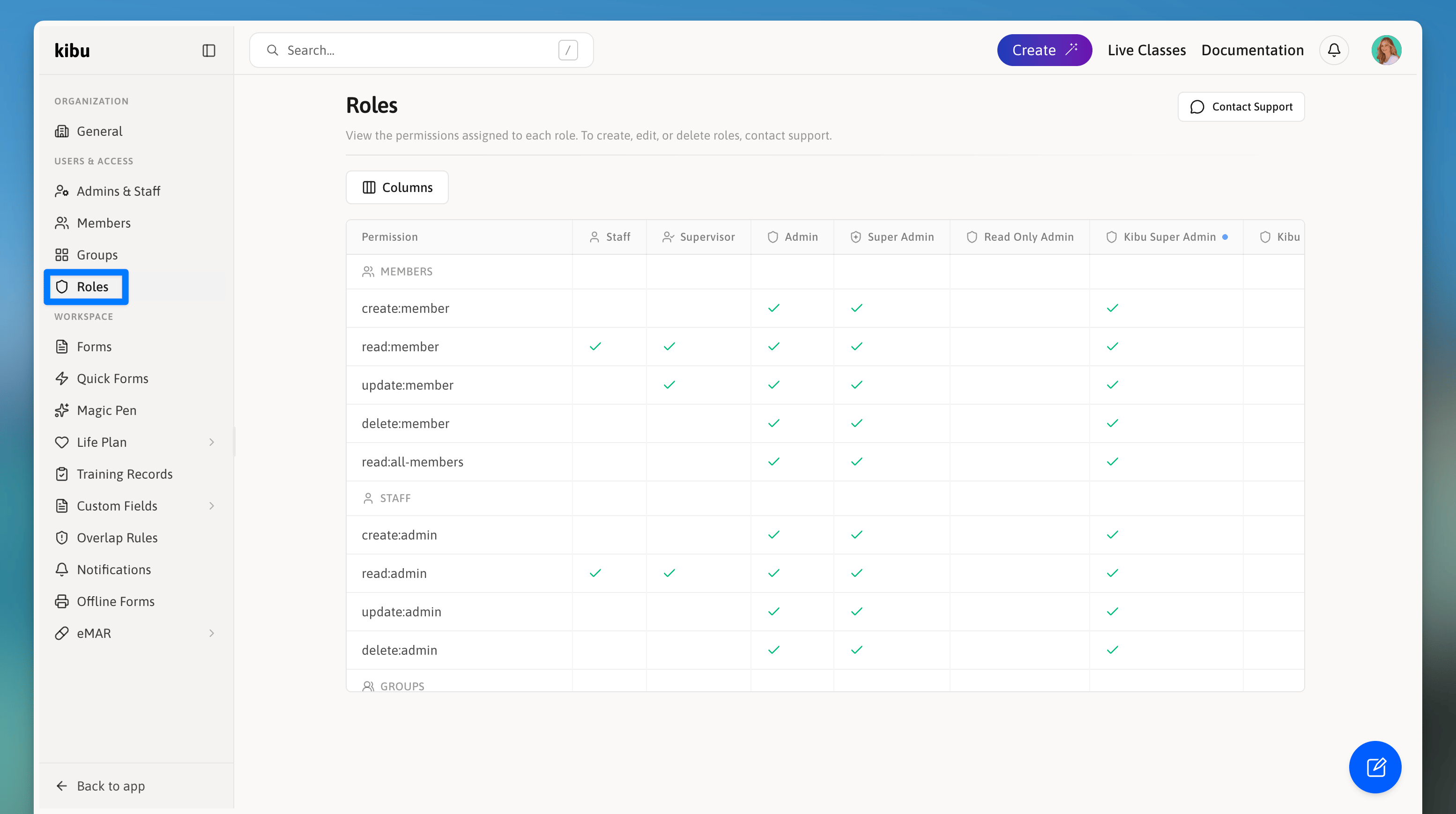 Kibu uses a role-based access control system to ensure that staff members have the appropriate level of access for their responsibilities. When adding staff members to your organization, it's important to assign the correct role based on their job functions and responsibilities.
***
## Quick Role Comparison
| Capability | Staff | Supervisor | Admin | Super Admin |
| ------------------------------------ | :---: | :--------: | :---: | :---------: |
| Create service records & quick notes | ✓ | ✓ | ✓ | ✓ |
| Manage tasks | | ✓ | ✓ | ✓ |
| Manage groups and org settings | | | ✓ | ✓ |
| Full medical data access | | ✓ | ✓ | ✓ |
| Organization-wide read access | | | | ✓ |
| Billing management | | | | ✓ |
***
## Detailed Permissions Matrix
Use this section when you need specifics. Expand a role to view its resource-level capabilities. Columns indicate Create, Read, Update, Delete, and Write.
Below are comprehensive tables showing what each role can and cannot do.
| Resource | Create | Read | Update | Write |
| ------------------------- | :----: | :--: | :----: | :---: |
| group-settings | | ✓ | | |
| analytics | | ✓ | | |
| admin | | ✓ | | |
| member | | ✓ | | |
| service-record | ✓ | ✓ | | ✓ |
| service-record-assignee | | | ✓ | |
| service-record-attendance | | | ✓ | |
| event | ✓ | ✓ | ✓ | |
| group-file | ✓ | ✓ | ✓ | |
| member-file | ✓ | ✓ | ✓ | |
| admin-file | ✓ | ✓ | ✓ | |
| life-plan | | ✓ | | |
| quick-note | ✓ | ✓ | | |
| emergency-contact | | ✓ | | |
| medical-history | | ✓ | | |
| forms | | ✓ | | |
| medication | | ✓ | | |
| mar | ✓ | ✓ | | |
| Resource | Create | Read | Update | Delete | Write |
| ------------------------- | :----: | :--: | :----: | :----: | :---: |
| group-settings | | ✓ | | | |
| analytics | | ✓ | | | |
| admin | | ✓ | | | |
| member | | ✓ | | | |
| service-record | ✓ | ✓ | | ✓ | ✓ |
| service-record-assignee | | | ✓ | | |
| service-record-attendance | | | ✓ | | |
| event | ✓ | ✓ | ✓ | ✓ | |
| group-file | ✓ | ✓ | ✓ | ✓ | |
| member-file | ✓ | ✓ | ✓ | ✓ | |
| admin-file | ✓ | ✓ | ✓ | ✓ | |
| life-plan | | ✓ | ✓ | ✓ | |
| quick-note | ✓ | ✓ | ✓ | ✓ | |
| emergency-contact | ✓ | ✓ | ✓ | ✓ | |
| medical-history | | ✓ | ✓ | | |
| forms | ✓ | ✓ | ✓ | ✓ | |
| medication | ✓ | ✓ | ✓ | ✓ | |
| mar | ✓ | ✓ | ✓ | ✓ | |
| live-class | | | ✓ | | |
| tasks | ✓ | ✓ | ✓ | ✓ | |
| compliance | | ✓ | | | |
| time-tracking | | | ✓ | ✓ | |
| communication | ✓ | | | | |
| Resource | Create | Read | Update | Delete | Write |
| ------------------------- | :----: | :--: | :----: | :----: | :---: |
| live-class | ✓ | | ✓ | ✓ | |
| tasks | ✓ | ✓ | ✓ | ✓ | |
| group | ✓ | | ✓ | ✓ | |
| group-access | | | ✓ | | |
| group-settings | | ✓ | ✓ | | |
| analytics | | ✓ | | | |
| organization-settings | | ✓ | ✓ | | |
| admin | ✓ | ✓ | ✓ | ✓ | |
| member | ✓ | ✓ | ✓ | ✓ | |
| permissions | | | ✓ | | |
| compliance | | ✓ | | | |
| service-record | ✓ | ✓ | | ✓ | ✓ |
| service-record-assignee | | | ✓ | | |
| service-record-attendance | | | ✓ | | |
| time-tracking | | | ✓ | ✓ | |
| event | ✓ | ✓ | ✓ | ✓ | |
| communication | ✓ | | | | |
| group-file | ✓ | ✓ | ✓ | ✓ | |
| member-file | ✓ | ✓ | ✓ | ✓ | |
| admin-file | ✓ | ✓ | ✓ | ✓ | |
| life-plan | ✓ | ✓ | ✓ | ✓ | |
| medical-data | ✓ | ✓ | | | |
| quick-note | ✓ | ✓ | ✓ | ✓ | |
| emergency-contact | ✓ | ✓ | ✓ | ✓ | |
| medical-history | | ✓ | ✓ | | |
| forms | ✓ | ✓ | ✓ | ✓ | |
| medication | ✓ | ✓ | ✓ | ✓ | |
| mar | ✓ | ✓ | ✓ | ✓ | |
Includes all Admin permissions, plus organization-wide capabilities:
* Read all groups across the organization
* Read all members across the organization
* Manage billing
***
## Role Descriptions
This section provides detailed descriptions of each role in the system, including their specific permissions and capabilities. Each role builds upon the previous one, with Super Admin having the highest level of access and control.
## Staff Role
The foundational role for team members working directly with members. Staff members focus on day-to-day interactions and basic documentation.
### What Staff Can Do
* Create and manage service records
* Update attendance and assignees
* Create and read quick notes
* View life plans
* View member profiles and emergency contacts
* Access medical history and medication records
* Create MAR entries
* View analytics
* Create and manage events
* Access group and member files
* Create and update files
Staff members have read-only access to group settings and administrative information.
***
## Supervisor Role
An enhanced role that includes all Staff permissions plus additional management capabilities. Supervisors oversee staff members and have broader access to organizational tools.
### What Supervisors Can Do (In Addition to Staff Permissions)
* Manage tasks (create, update, delete)
* Access all compliance documentation
* Delete service records
* Manage time tracking entries
* Full control over group and member files
* Manage life plans
* Edit and delete quick notes
* Create and manage medical forms
* Manage medication records
* Full MAR management
* Handle emergency contact information
***
## Admin Role
Full administrative control with comprehensive access to organizational settings and management tools. Includes all Supervisor permissions plus additional capabilities.
### What Admins Can Do (In Addition to Supervisor Permissions)
* Create and manage groups
* Update group and organization settings
* Manage access controls
* Create and manage admin accounts
* Create and delete member profiles
* Update permissions
* Full medical data access
* Manage organization-wide settings
***
## Super Admin Role
The highest level of access in the system. Includes all Admin permissions plus organization-wide capabilities.
### What Super Admins Can Do (In Addition to Admin Permissions)
* Access to all groups across organization
* View all member information
* Modify time tracking entries
* Override system restrictions when necessary
* Access to billing information
***
## Custom Staff Roles
While Kibu provides standard roles (Staff, Supervisor, Admin, Super Admin) that work for most organizations, we understand that some organizations have unique requirements that don't fit perfectly into these predefined roles.
### When Custom Roles Are Needed
Custom roles may be beneficial when your organization needs:
Unique combinations of access levels that don't match standard roles.
Specific permission sets required by regulatory bodies.
Different access levels for various departments or programs.
### How Custom Roles Work
Our development team can create custom roles that:
Mix and match capabilities from existing roles.
Limit access to specific resources or groups.
Include specialized permissions not available in standard roles.
Ensure proper access control while meeting your specific needs.
### Requesting Custom Roles
To request a custom role for your organization:
Reach out to our support team at [support@kibuhq.com](mailto:support@kibuhq.com)
Provide detailed information about:
* What permissions the role needs
* What permissions should be restricted
* How the role differs from existing standard roles
* Who will use this role and why
Our team will review your requirements and work with you to design the appropriate role.
Once approved, we'll implement the custom role in your organization.
Custom roles are implemented by our development team and may require additional setup time. Contact us early in your planning process to ensure timely implementation.
***
## Best Practices
When assigning roles, consider the following best practices:
Assign the minimum level of access required for each staff member to perform their duties.
Periodically review and update role assignments as staff responsibilities change.
Ensure staff members understand the scope and limitations of their assigned roles.
If standard roles don't meet your needs, consider requesting custom roles early in your implementation process.
Kibu uses a role-based access control system to ensure that staff members have the appropriate level of access for their responsibilities. When adding staff members to your organization, it's important to assign the correct role based on their job functions and responsibilities.
***
## Quick Role Comparison
| Capability | Staff | Supervisor | Admin | Super Admin |
| ------------------------------------ | :---: | :--------: | :---: | :---------: |
| Create service records & quick notes | ✓ | ✓ | ✓ | ✓ |
| Manage tasks | | ✓ | ✓ | ✓ |
| Manage groups and org settings | | | ✓ | ✓ |
| Full medical data access | | ✓ | ✓ | ✓ |
| Organization-wide read access | | | | ✓ |
| Billing management | | | | ✓ |
***
## Detailed Permissions Matrix
Use this section when you need specifics. Expand a role to view its resource-level capabilities. Columns indicate Create, Read, Update, Delete, and Write.
Below are comprehensive tables showing what each role can and cannot do.
| Resource | Create | Read | Update | Write |
| ------------------------- | :----: | :--: | :----: | :---: |
| group-settings | | ✓ | | |
| analytics | | ✓ | | |
| admin | | ✓ | | |
| member | | ✓ | | |
| service-record | ✓ | ✓ | | ✓ |
| service-record-assignee | | | ✓ | |
| service-record-attendance | | | ✓ | |
| event | ✓ | ✓ | ✓ | |
| group-file | ✓ | ✓ | ✓ | |
| member-file | ✓ | ✓ | ✓ | |
| admin-file | ✓ | ✓ | ✓ | |
| life-plan | | ✓ | | |
| quick-note | ✓ | ✓ | | |
| emergency-contact | | ✓ | | |
| medical-history | | ✓ | | |
| forms | | ✓ | | |
| medication | | ✓ | | |
| mar | ✓ | ✓ | | |
| Resource | Create | Read | Update | Delete | Write |
| ------------------------- | :----: | :--: | :----: | :----: | :---: |
| group-settings | | ✓ | | | |
| analytics | | ✓ | | | |
| admin | | ✓ | | | |
| member | | ✓ | | | |
| service-record | ✓ | ✓ | | ✓ | ✓ |
| service-record-assignee | | | ✓ | | |
| service-record-attendance | | | ✓ | | |
| event | ✓ | ✓ | ✓ | ✓ | |
| group-file | ✓ | ✓ | ✓ | ✓ | |
| member-file | ✓ | ✓ | ✓ | ✓ | |
| admin-file | ✓ | ✓ | ✓ | ✓ | |
| life-plan | | ✓ | ✓ | ✓ | |
| quick-note | ✓ | ✓ | ✓ | ✓ | |
| emergency-contact | ✓ | ✓ | ✓ | ✓ | |
| medical-history | | ✓ | ✓ | | |
| forms | ✓ | ✓ | ✓ | ✓ | |
| medication | ✓ | ✓ | ✓ | ✓ | |
| mar | ✓ | ✓ | ✓ | ✓ | |
| live-class | | | ✓ | | |
| tasks | ✓ | ✓ | ✓ | ✓ | |
| compliance | | ✓ | | | |
| time-tracking | | | ✓ | ✓ | |
| communication | ✓ | | | | |
| Resource | Create | Read | Update | Delete | Write |
| ------------------------- | :----: | :--: | :----: | :----: | :---: |
| live-class | ✓ | | ✓ | ✓ | |
| tasks | ✓ | ✓ | ✓ | ✓ | |
| group | ✓ | | ✓ | ✓ | |
| group-access | | | ✓ | | |
| group-settings | | ✓ | ✓ | | |
| analytics | | ✓ | | | |
| organization-settings | | ✓ | ✓ | | |
| admin | ✓ | ✓ | ✓ | ✓ | |
| member | ✓ | ✓ | ✓ | ✓ | |
| permissions | | | ✓ | | |
| compliance | | ✓ | | | |
| service-record | ✓ | ✓ | | ✓ | ✓ |
| service-record-assignee | | | ✓ | | |
| service-record-attendance | | | ✓ | | |
| time-tracking | | | ✓ | ✓ | |
| event | ✓ | ✓ | ✓ | ✓ | |
| communication | ✓ | | | | |
| group-file | ✓ | ✓ | ✓ | ✓ | |
| member-file | ✓ | ✓ | ✓ | ✓ | |
| admin-file | ✓ | ✓ | ✓ | ✓ | |
| life-plan | ✓ | ✓ | ✓ | ✓ | |
| medical-data | ✓ | ✓ | | | |
| quick-note | ✓ | ✓ | ✓ | ✓ | |
| emergency-contact | ✓ | ✓ | ✓ | ✓ | |
| medical-history | | ✓ | ✓ | | |
| forms | ✓ | ✓ | ✓ | ✓ | |
| medication | ✓ | ✓ | ✓ | ✓ | |
| mar | ✓ | ✓ | ✓ | ✓ | |
Includes all Admin permissions, plus organization-wide capabilities:
* Read all groups across the organization
* Read all members across the organization
* Manage billing
***
## Role Descriptions
This section provides detailed descriptions of each role in the system, including their specific permissions and capabilities. Each role builds upon the previous one, with Super Admin having the highest level of access and control.
## Staff Role
The foundational role for team members working directly with members. Staff members focus on day-to-day interactions and basic documentation.
### What Staff Can Do
* Create and manage service records
* Update attendance and assignees
* Create and read quick notes
* View life plans
* View member profiles and emergency contacts
* Access medical history and medication records
* Create MAR entries
* View analytics
* Create and manage events
* Access group and member files
* Create and update files
Staff members have read-only access to group settings and administrative information.
***
## Supervisor Role
An enhanced role that includes all Staff permissions plus additional management capabilities. Supervisors oversee staff members and have broader access to organizational tools.
### What Supervisors Can Do (In Addition to Staff Permissions)
* Manage tasks (create, update, delete)
* Access all compliance documentation
* Delete service records
* Manage time tracking entries
* Full control over group and member files
* Manage life plans
* Edit and delete quick notes
* Create and manage medical forms
* Manage medication records
* Full MAR management
* Handle emergency contact information
***
## Admin Role
Full administrative control with comprehensive access to organizational settings and management tools. Includes all Supervisor permissions plus additional capabilities.
### What Admins Can Do (In Addition to Supervisor Permissions)
* Create and manage groups
* Update group and organization settings
* Manage access controls
* Create and manage admin accounts
* Create and delete member profiles
* Update permissions
* Full medical data access
* Manage organization-wide settings
***
## Super Admin Role
The highest level of access in the system. Includes all Admin permissions plus organization-wide capabilities.
### What Super Admins Can Do (In Addition to Admin Permissions)
* Access to all groups across organization
* View all member information
* Modify time tracking entries
* Override system restrictions when necessary
* Access to billing information
***
## Custom Staff Roles
While Kibu provides standard roles (Staff, Supervisor, Admin, Super Admin) that work for most organizations, we understand that some organizations have unique requirements that don't fit perfectly into these predefined roles.
### When Custom Roles Are Needed
Custom roles may be beneficial when your organization needs:
Unique combinations of access levels that don't match standard roles.
Specific permission sets required by regulatory bodies.
Different access levels for various departments or programs.
### How Custom Roles Work
Our development team can create custom roles that:
Mix and match capabilities from existing roles.
Limit access to specific resources or groups.
Include specialized permissions not available in standard roles.
Ensure proper access control while meeting your specific needs.
### Requesting Custom Roles
To request a custom role for your organization:
Reach out to our support team at [support@kibuhq.com](mailto:support@kibuhq.com)
Provide detailed information about:
* What permissions the role needs
* What permissions should be restricted
* How the role differs from existing standard roles
* Who will use this role and why
Our team will review your requirements and work with you to design the appropriate role.
Once approved, we'll implement the custom role in your organization.
Custom roles are implemented by our development team and may require additional setup time. Contact us early in your planning process to ensure timely implementation.
***
## Best Practices
When assigning roles, consider the following best practices:
Assign the minimum level of access required for each staff member to perform their duties.
Periodically review and update role assignments as staff responsibilities change.
Ensure staff members understand the scope and limitations of their assigned roles.
If standard roles don't meet your needs, consider requesting custom roles early in your implementation process.