

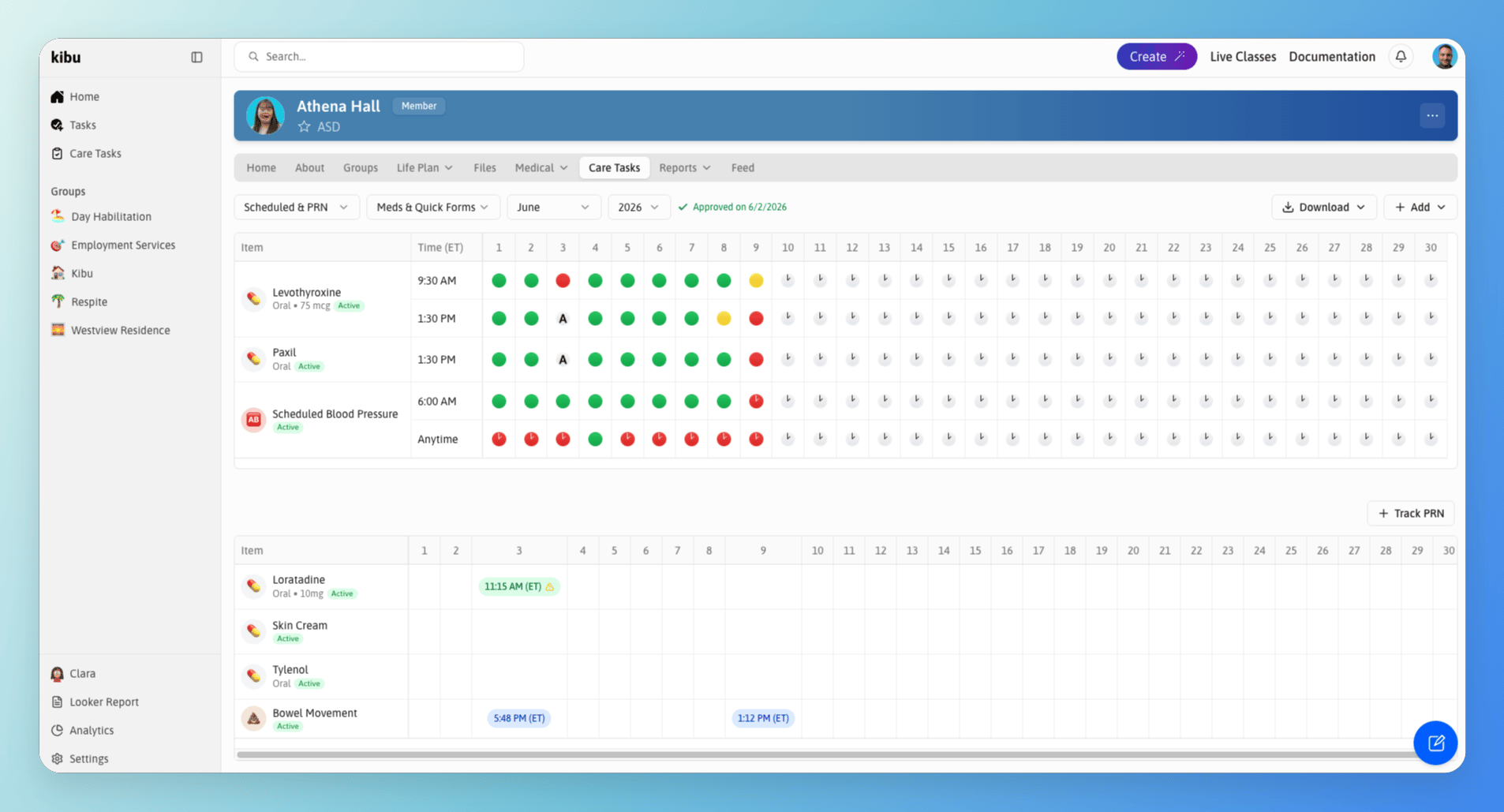
eMAR page located in the medical tab of each member's profile.
Recording a Medication Administration
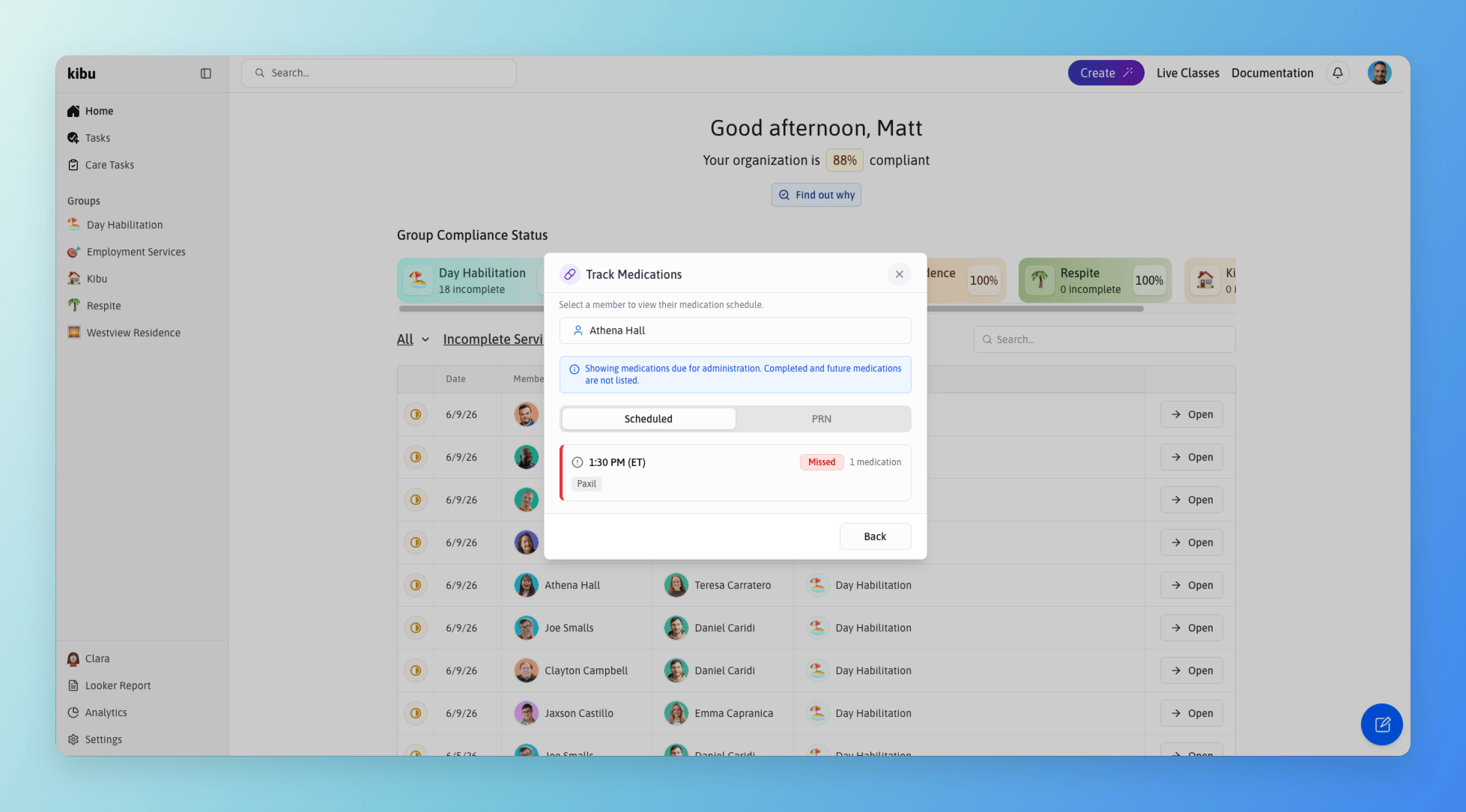
The medication administration start screen showing missed and upcoming medications together in a single view.
1
Open Care Tasks or click the Track Medication button
2
Select the member
3
You will see missed and upcoming medications together in a single view
4
Select the Scheduled or PRN medication you are administering
For PRN medications, you can administer multiple at once.
5
On the next screen, review the details for each medication
- A photo of the medication for visual confirmation (if one has been added)
- Side effects to monitor
- Administration instructions
6
Select the appropriate administration status for each
7
Add any notes if needed
8
Review your entries and click Confirm to finalize
All medication information including images, side effects, and instructions can be added or edited in the pharmacy section of each member’s profile. Learn more about managing medications in the Pharmacy Page.
- View a calendar-style interface showing medication records for each day of the month
- Track multiple medications per member with specific administration times
- Record the status of each medication administration
- Send notifications to staff members
Administration Statuses
For each medication administration, you can mark one of the following statuses:
When marking a medication as “Administered Incorrectly” or “Not Administered”, you can:
- Document the reason for the deviation
- Add detailed notes about the situation
- Complete a medication incident report if required
If a medication administration was logged by mistake, it can be deleted. Only administrators can delete eMAR entries. To request a correction, contact your organization’s administrator.
Scheduled and PRN Medications
Medications are organized into two separate tabs:Scheduled medications
Medications given on a regular, time-based schedule.
PRN medications
Medications given as needed.
Recording a Missed Medication
If a medication was not documented on the correct day and needs to be added after the fact:1
Navigate to the member's eMAR
2
Use the calendar view to navigate to the date the medication was missed
3
Follow the prompts to record the administration for that date
Tracking Medications from Care Tasks
Scheduled medications and PRN medications can both be tracked directly from a member’s Care Tasks page, you do not need to navigate to the Medications section to log either. To get there, open the member’s profile and select the Care Tasks tab.Medication Error Reports
If your organization has a Medication Error Report form set up, you can log an error directly from the MAR. If you don’t have one yet, contact support@kibu.com and the Kibu team will help you get it added. Once your form is in place, there are two ways to file a report:- From the MAR
- From Member Profile
Click on any dose that was administered incorrectly and select Create Medication Error Form. This will take you directly to the report.
Monthly Reports
The eMAR system makes it easy to generate and download monthly medication tracking reports:- Export comprehensive monthly records for each member
- Include all administration statuses and notes
- Generate reports in an excel sheet format for record-keeping
- Share reports with healthcare providers or administrators as needed